
Harmonizer
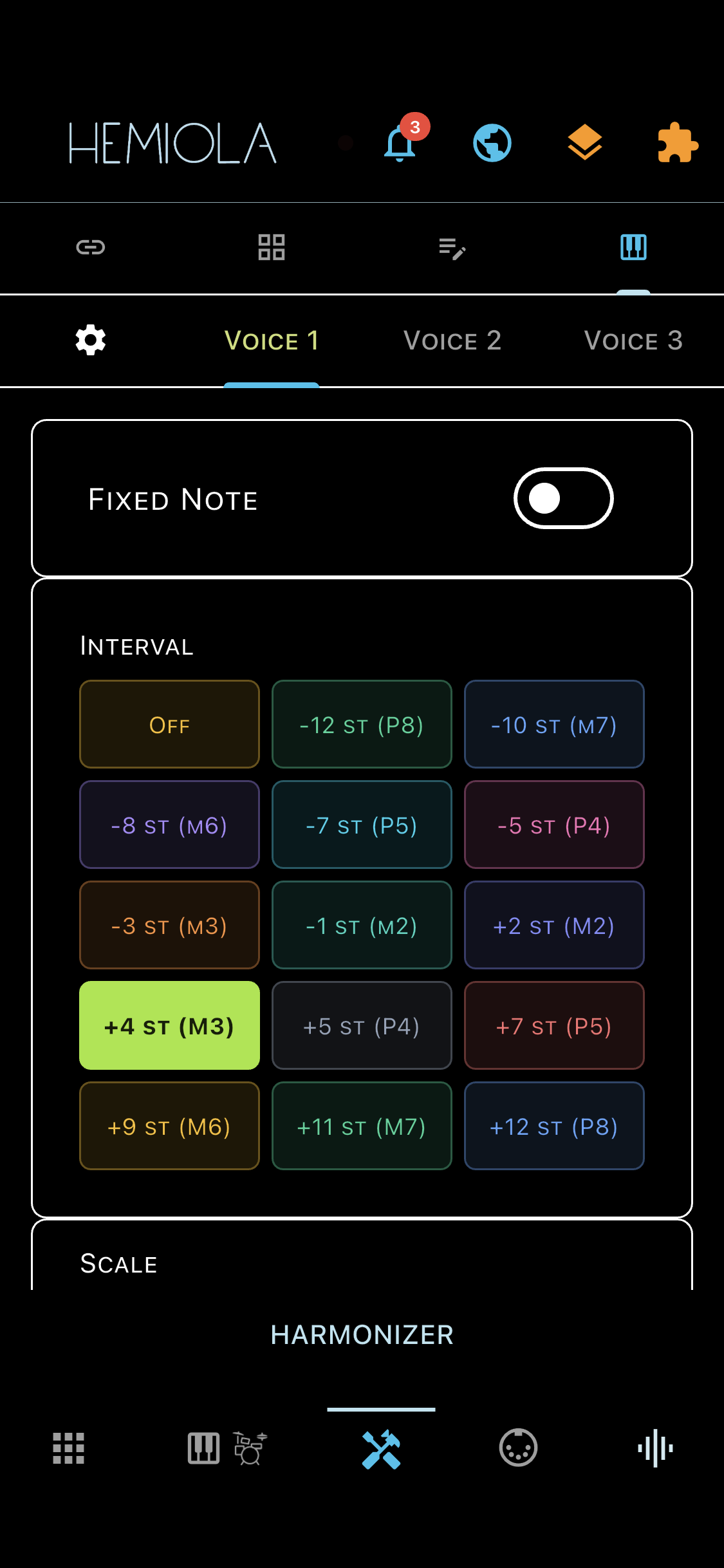
The Harmonizer generates up to 3 additional voices in real time, harmonised with every note you play. Voices follow a diatonic scale (intervals staying within a chosen key) or a fixed chromatic offset.
To open the Harmonizer, tap the Tools tab in the bottom bar, then select the Harmonizer sub-tab.
Getting Started
- Enable the Harmonizer with the master switch at the top of the panel.
- Source Device — select the MIDI device (or 'Any Device') whose notes will be harmonised. Notes from other devices pass through unchanged.
- Control Device — the MIDI device that sends real-time CC messages to control Harmonizer parameters remotely.
Voices
There are 3 independent voices (Voice 1, Voice 2, Voice 3), each with its own interval, scale, and root note.
- Interval — the harmonic interval for this voice, from −12 st (octave below) to +12 st (octave above). Select 'Off' to disable the voice.
- Scale and Root Note — define the diatonic key. Only scale tones are shown in the interval picker when Chromatic Mode is off.
- Velocity — the MIDI velocity of the harmonised note (0–127). Enable 'As Source' to copy the velocity from the incoming note.
Fixed Note
Each voice can be locked to a single pitch (pedal tone) regardless of which note is played.
- Enable the Fixed Note toggle, then tap Learn and play any note on the MIDI source. The note is stored immediately and Learn mode exits automatically.
- When a fixed note is active, the scale and interval controls for that voice are hidden.
Chromatic Mode
When Chromatic Mode is on, all voices use a fixed semitone offset regardless of scale. The Scale and Root Note pickers are hidden.
MIDI Thru
When enabled, harmonised notes are also forwarded to all connected hardware MIDI devices. The internal SoundFont always receives harmonised notes.
Keyboard Feedback
Harmonised notes appear on the on-screen piano keyboard with distinct colours: Voice 1 (lime green), Voice 2 (mauve pink), Voice 3 (lavender blue). In Chromatic Mode the colours shift to an orange-red family.
Presets
Use the Preset icon in the top bar to save and recall Harmonizer configurations.
Real-Time Control (CC)
When a Control Device is configured, these MIDI CC messages control the Harmonizer in real time:
| CC | Parameter |
|---|---|
| CC20 | Master On/Off |
| CC21 | Voice 1 Interval |
| CC22 | Voice 2 Interval |
| CC23 | Voice 3 Interval |
| CC24 | Voice 1 Scale |
| CC25 | Voice 2 Scale |
| CC26 | Voice 3 Scale |
| CC27 | Root Note (shared) |
| CC28 | Chromatic Mode |
| CC29 | Chord Learning |
| CC30 | Voice Enable (bitmask) |