
Push Notifications
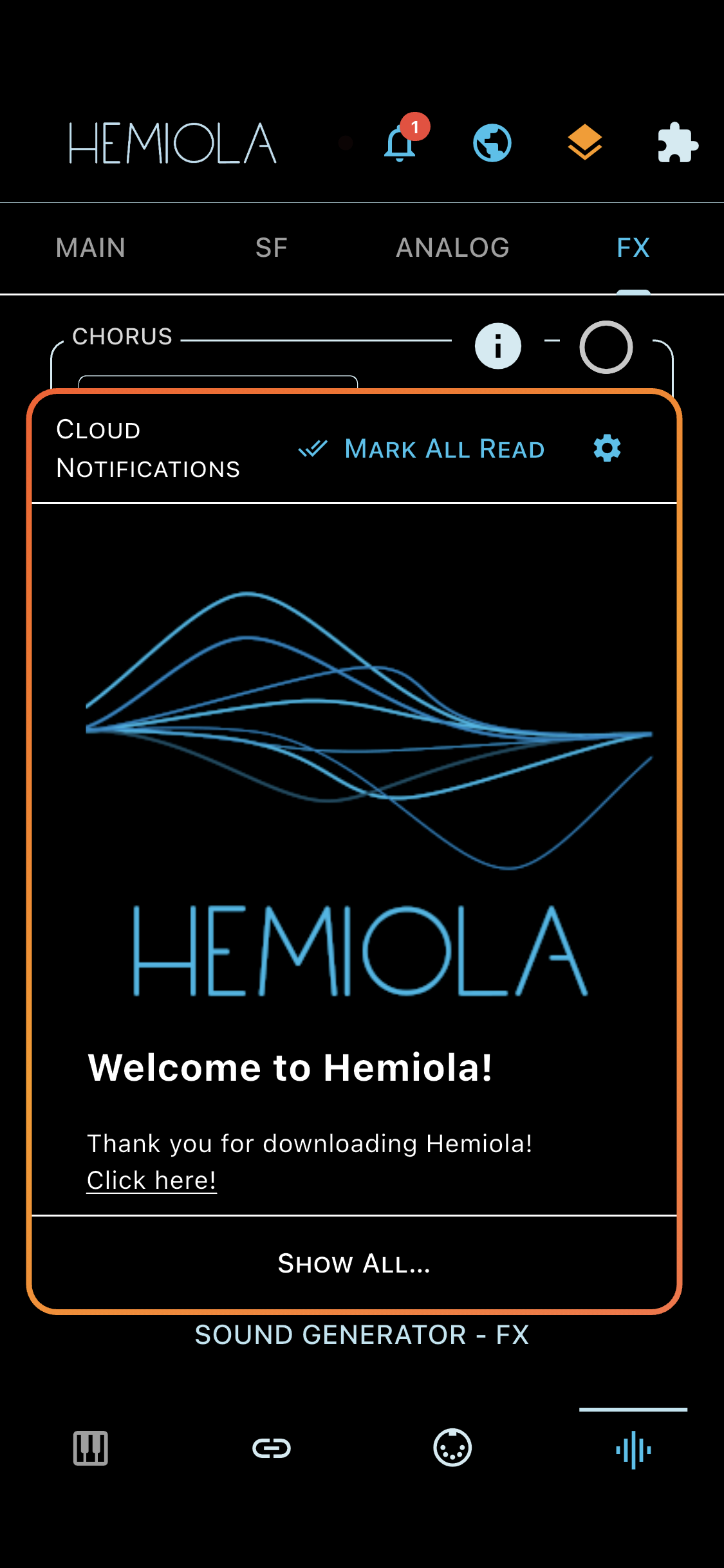
Push Notifications let Hemiola reach you with announcements, offers, updates, and system messages. Notifications are delivered in real time when the app is open. On reconnection, any missed notifications are fetched automatically from the server.
Bell Icon
The bell icon in the app bar is visible for both signed-in users and guests. A red badge shows the number of unread notifications. Tap the icon to open the notifications panel, which expands directly below the icon.
- Unread notifications are shown with a filled circle; read notifications with an empty circle
- Tap a notification to expand it and read the full content
- Tap the settings icon in the top-right corner of the popup to open Cloud Account and manage notification preferences
- Tap the dismiss button (×) on a notification to hide it from the list
- Tap Mark All Read to mark all visible notifications as read at once
- Tap Show All to open the full notifications page with the complete history
Cross-Device Sync
When signed in, notification read and dismissed state is synchronised across all your devices. In guest mode, notification state is tracked per device only and is not synchronised to other devices.
A notification you have already dismissed will not reappear, even if the same notification is re-sent by the server.